Punch lists your subs actually use.
Log issues with marked-up, timestamped photos. Send each trade a private link — no login, no app to install. They comment, mark it done, and you approve. Set up in minutes, flat price per project.
Free trial on a real project. No credit card required to start.
- No login for trades
- Works offline on site
- PDF packets by trade or location
- Import your existing list
How it works
The whole loop, from walk to sign-off, without chasing anyone for a password.
Walk & capture
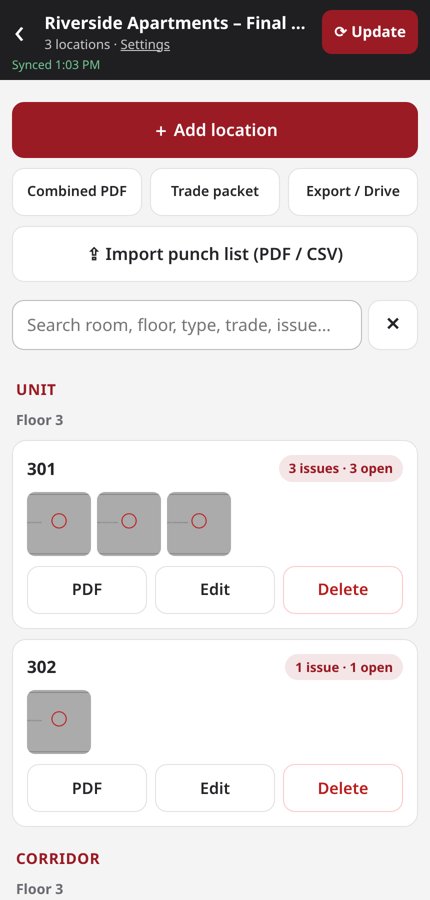
Pick a location (unit, floor, room, area, sitework), snap a photo, circle the problem, tag the trade and priority. Every photo is timestamped.
Share one link per trade
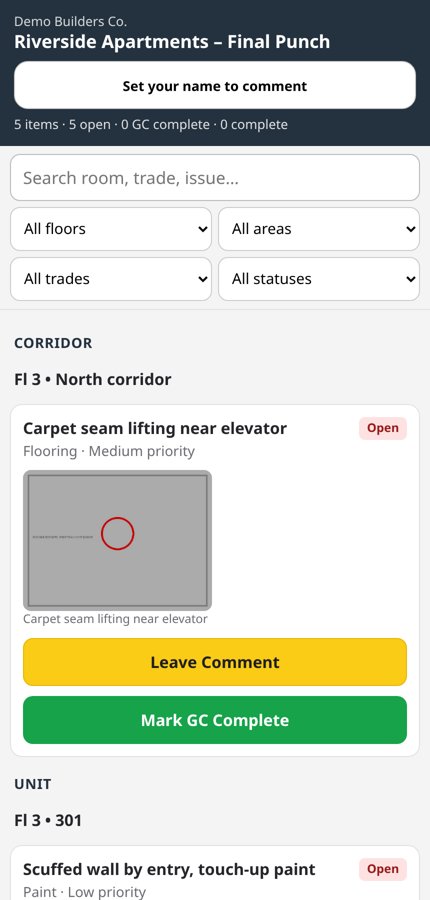
Each sub gets a private link showing only their items. They open it on any phone — no account, no app store.
Trades fix & mark complete
Subs leave threaded comments with their first name and tap Mark GC Complete when the work is done.
You approve & close
The inspector reviews and approves or reopens. Export a clean PDF packet by location or by trade for the owner or the file.
The trade link is the whole point.
Most punch tools fail at the last step: getting subs to look. Site Punch removes the friction.
- No login, no install. A private link opens straight to that trade's items.
- Filters built in. Floors, areas, trades and statuses — so a foreman finds their work fast.
- First-name comments. e.g. “Need access to 302 Thursday — Mike.” Threaded on the item, not lost in a text chain.
- One tap to finish. “Mark GC Complete” flags it for inspector approval.
Everything a punch walk needs. Nothing it doesn't.
Built for the field first — a mobile web app that keeps working when the signal doesn't.
Marked-up, timestamped photos
Circle the defect right on the photo. Time-stamped so there's no argument about when it was logged.
Private no-login trade links
Each trade sees only its own items, can comment, and can mark work GC Complete.
Inspector approval
Nothing is closed until the inspector approves it. Reopen with a note if it isn't right.
PDF packets
Combined PDF, per-location PDF, or a trade packet — ready to email or file.
Project templates
Start from the structure that fits the job.
Import existing lists
Upload a punch list PDF or CSV (Location, Floor, Issue, Trade, Priority). Preview before anything is added.
Offline-capable
Keep logging in basements, stairwells and new builds with no signal. Syncs when you're back online.
Multi-company accounts
Run punch lists for more than one company or client from one login, with separate teams and projects.
Fast search
Search by room, floor, type, trade or issue across the whole project.
Built for the people who walk the job
Whether you're closing out a 12-unit renovation or turning over a floor of a hotel.
Flat price per project. Unlimited trades.
You pay for the projects you're actively punching — not for every sub, super and inspector who touches them.
Free trial
Try it on one real job, then upgrade.
- 1 active project
- Up to 25 issues
- 2 photos per issue, with markup & timestamps
- 1 view-only trade link (trades can see items)
- Single-location PDFs, watermarked
- 1 user
Per project
Everything unlocked, for every job you're running.
- Unlimited issues and photos
- Unlimited trade links — trades comment and mark GC Complete
- Combined and trade packets, no watermark
- PDF/CSV punch-list import
- Unlimited team members
- Archive projects when they close
Placeholder pricing. Prices shown are preliminary and subject to change before general availability.
Why teams pick Site Punch
Full construction platforms do a lot. If what you need right now is a punch list subs will open, here's the difference.
| Site Punch | Typical all-in-one platform | |
|---|---|---|
| Trade access | Private link, no login | Usually invited user accounts |
| Setup | Minutes — template + import | Often an implementation process |
| Pricing model | Flat per active project | Per user or by construction volume |
| Scope | Punch lists & closeout | Drawings, RFIs, submittals, financials & more |
Comparison is general; check each vendor's current plans and pricing.
Free closeout checklists
Printable PDFs your field team can use today, no signup needed.
Frequently asked questions
Do my subcontractors need an account?
No. Each trade gets a private link that shows only their items — no password, no app download. On paid projects they enter a first name to comment and can mark items GC Complete; on the free trial the link is view-only.
Is the trade link secure?
Links are private and unguessable, and only show that trade's items for that project. Treat a link like you would a shared document link and share it only with the intended trade.
What counts as an “active project”?
A project you're currently punching. When a job closes out, archive it and it no longer counts toward your plan.
Does it work without cell service?
Yes. Site Punch is an offline-capable mobile web app — you can keep logging items and photos without signal, and it syncs when you reconnect.
Can I bring in a punch list I already have?
Yes, on the paid plan. Upload a PDF or a CSV with columns like Location, Floor, Issue, Trade and Priority. You'll see a preview before anything is added.
Is there an app to download?
No app store needed. Open Site Punch in your phone's browser; you can add it to your home screen for one-tap access.
What do I hand the owner at closeout?
Export per-location PDFs on any plan, or combined PDFs and trade packets with photos, status and comments on the paid plan.
Can I manage more than one company?
Yes. Multi-company accounts let owner's reps, inspection firms and GCs with multiple entities keep projects and teams separate.
Who's behind Site Punch?
Site Punch is a product of Shreeji Hotel Group, LLC.
Run your next punch walk on Site Punch.
Set up a project in minutes. Start with a free trial project.
Start your free project →